Geographic Intelligence

Geo Insights

See where your ad dollars actually work.

Where are your best customers coming from? Are you spending money in areas that never convert? Which markets should you expand into? Geo Insights answers all of it on a single map.

See Your Market
Geo Insights map-based analytics dashboard

The Platform

A map-based analytics dashboard that shows you where your marketing is working.

Geo Insights combines your Google Ads performance, 12 months of sales history, demographic data, and competitive intelligence into one view. See where opportunities are hiding and where you're losing to competitors.

The Problem

Fixed radius targeting ignores how customers actually behave.

Most geographic targeting starts with an assumption: pick a radius that feels right, draw a circle, and call it a day.

But that's not how customers actually behave. Urban dealerships surrounded by competitors might only draw efficiently from 25 miles. Rural stores with less competition often pull buyers from 50+ miles out.

The insight: Geo Insights calculates your Core Market from your actual sales data—not assumptions.

How we calculate your Core Market:

1. Establish baseline performance

We calculate your home-turf conversion rate—the percentage of nearby households that become customers, using U.S. Census population data.

2. Analyze population-normalized performance

Expanding distance bands are evaluated against expected sales based on household density. The algorithm detects sustained degradation—not statistical noise.

3. Apply the median distance floor

Your Core Market always captures at least 50% of actual sales, ensuring the boundary reflects real customer behavior.

Market Segmentation

Beyond your Core Market, we identify opportunities.

C

Core Market

Where you actually win—calculated from your sales data, not assumptions.

E

Edge Markets

Sales clusters that partially overlap your boundary. Opportunities to extend your reach.

X

Expansion Markets

Clusters completely outside your core. These deserve dedicated campaigns.

Geo Insights interactive performance map showing ZIP code performance overlays

Interactive Performance Map

See performance by ZIP code at a glance.

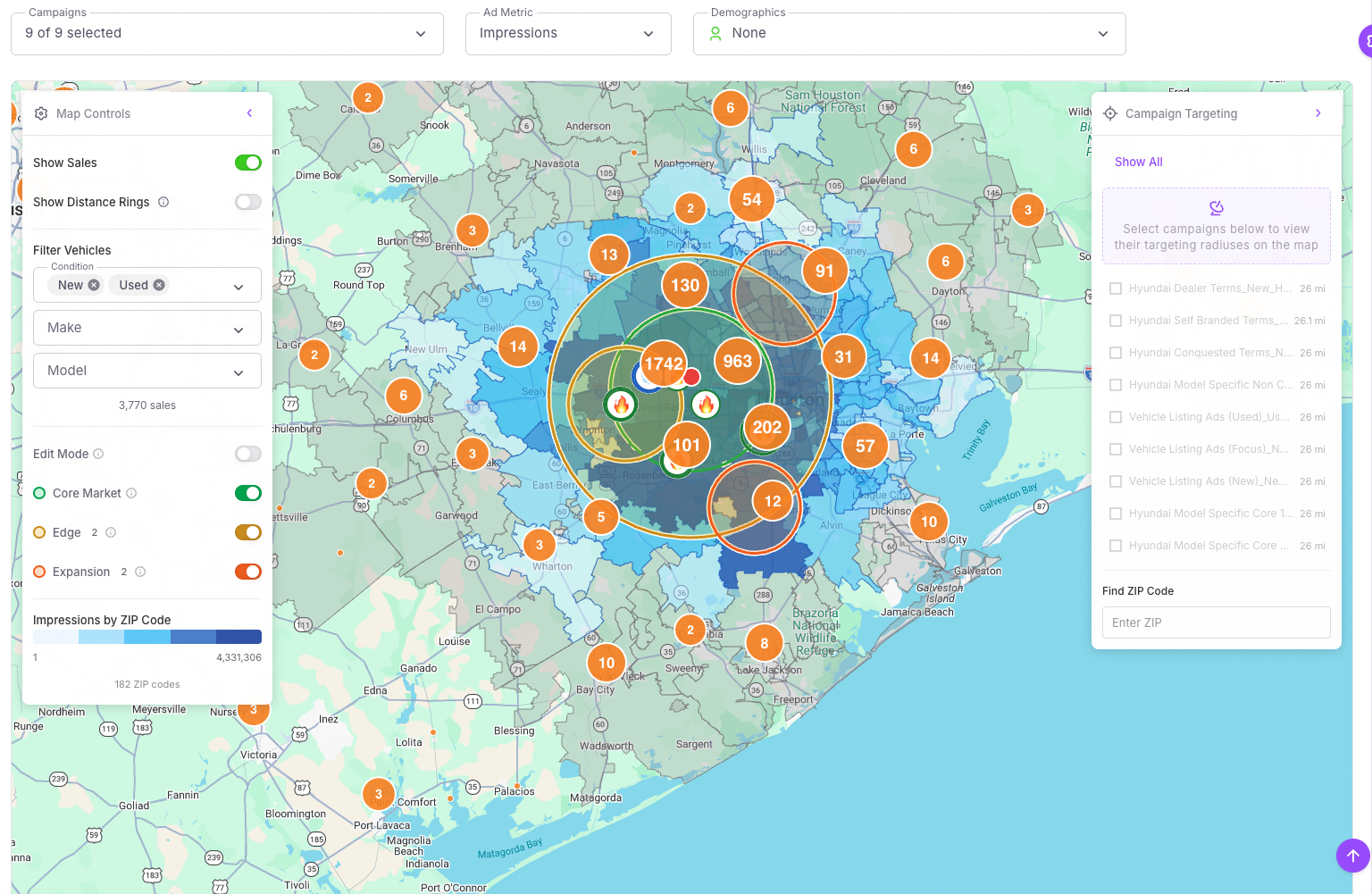
The heart of Geo Insights is a map that displays performance by ZIP code with color-coded overlays. See where impressions, clicks, cost-per-sale, and sales volume are concentrated.

  • Individual sale locations with smart clustering
  • Campaign targeting areas (radius and location-based)
  • Competitor locations
  • Distance rings showing 10-mile increments

Blue gradients show ad performance intensity. Green gradients reveal demographic concentrations. Multiple lenses, one map.

Market Reach Analysis

How does performance change with distance?

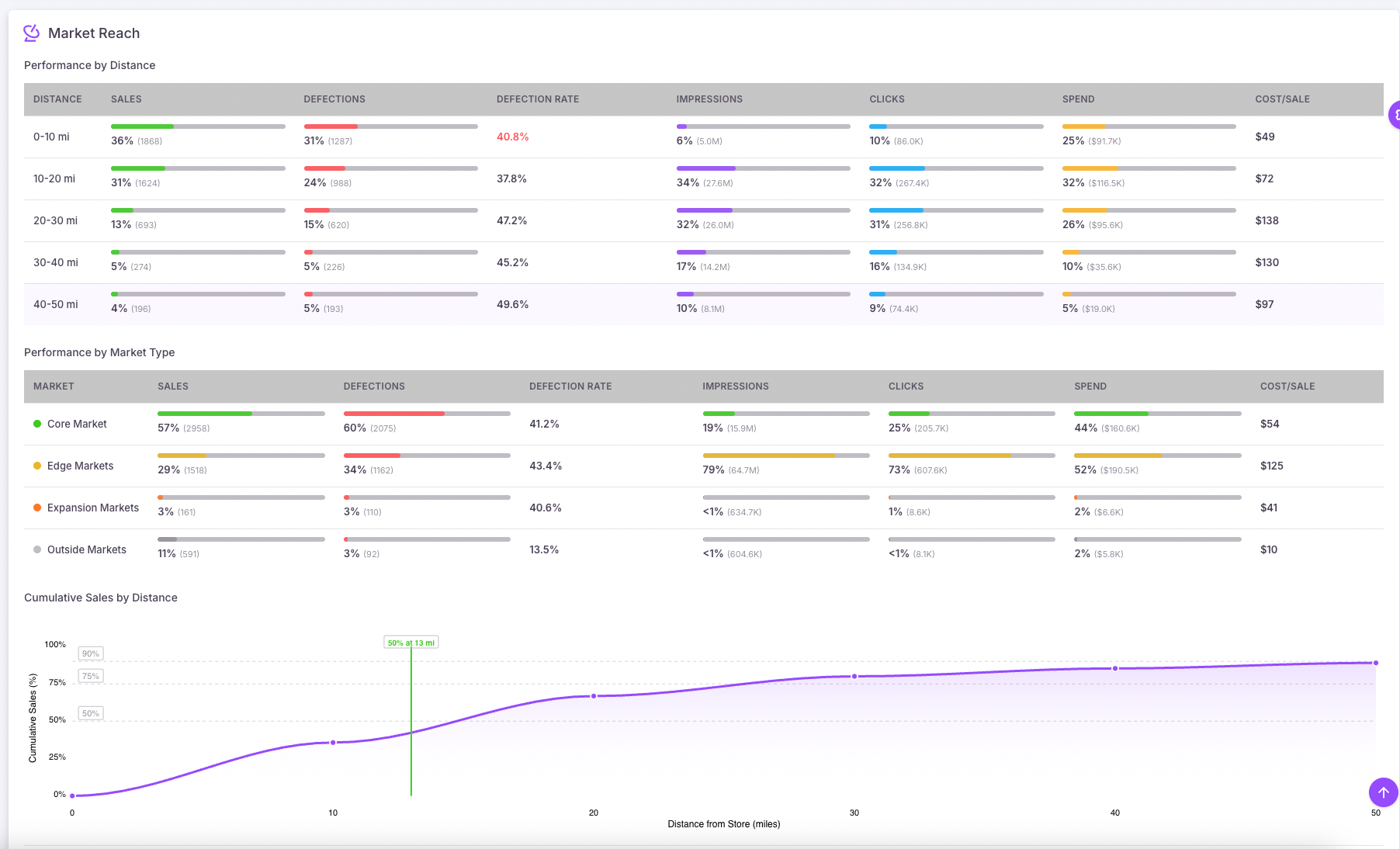
The Market Reach breakdown shows you exactly what's happening in each distance band (0-10 miles, 10-20 miles, and so on):

  • Total sales and percentage of overall volume
  • Ad impressions and clicks
  • Total spend and cost per sale
  • Customer defections to competitors

The cumulative sales curve shows where your sales trail off—your 50th, 75th, and 90th percentile distances. If you're spending heavily in areas beyond your natural draw, you'll see it immediately.

Market Reach Analysis showing performance by distance with cumulative sales curve
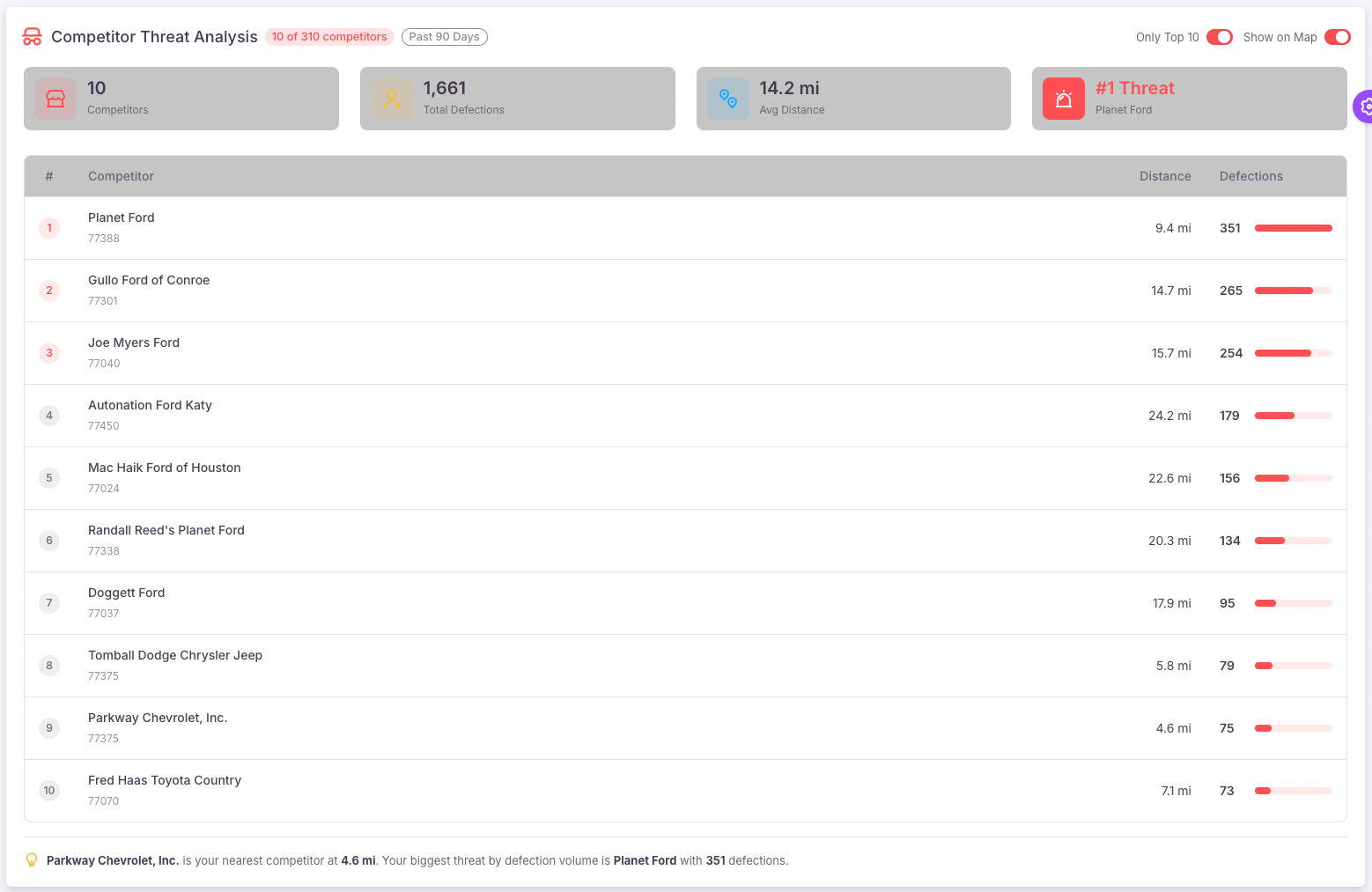
Competitor threat analysis showing defections and competitor locations

Competitor Threat Intelligence

Know where you're winning—and where you're losing.

Knowing where you're winning is half the battle. You also need to know where you're losing—and to whom.

The Competitor Threat Analysis shows:

! Total competitors in your market
! Defection counts from the past 90 days
! Top threats ranked by volume
! Geographic proximity of each competitor

Red markers show exactly where competitors are pulling your customers. Click any competitor to see their defection count and location.

*Competitor Threat Intelligence requires a subscription to Urban Science.
AI-Powered Geo Recommendations

Stop guessing where to focus expansion efforts.

The Recommended Store Geos feature uses ensemble machine learning—combining multiple clustering algorithms—to identify the most promising geographic opportunities.

Each recommendation includes:

  • Cluster type (Expansion or Edge)
  • Confidence score
  • Sales volume within the cluster
  • Average distance from your store
  • Algorithm agreement (how many approaches identified this opportunity)

Filter by vehicle segment

Looking to expand your truck market? Filter by trucks. Growing CPO sales? Filter by used inventory. The recommendations adapt to your goals.

Example: Filter to F-150 purchases, hit "Find Targets", and get geographic clusters where that model has sold well—with centroids ready for Google Ads proximity targeting.

Model-Specific Campaign Targeting

This is where Geo Insights becomes a campaign-building tool.

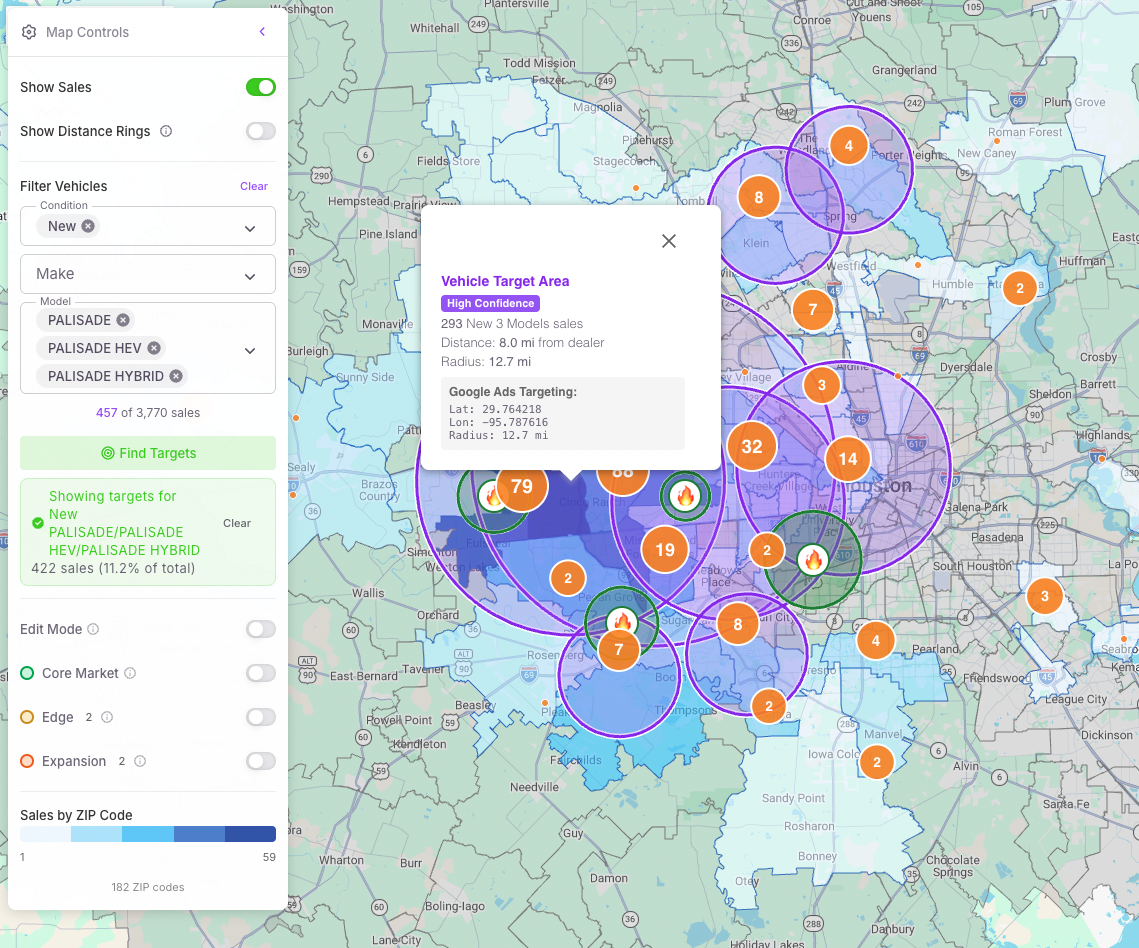
Say you're launching an F-150 promotion. Filter your sales to show only F-150 purchases, then hit Find Targets. The system analyzes 12 months of data and identifies geographic clusters where that model has sold well.

You get:

  • • Market circles showing where buyers are concentrated
  • • Cluster centroids with recommended radii
  • • Confidence scores for each cluster
  • • Sales counts within each area

The centroids are designed for easy loading into Google Ads proximity targeting.

Model-specific targeting showing vehicle filter and Google Ads targeting coordinates
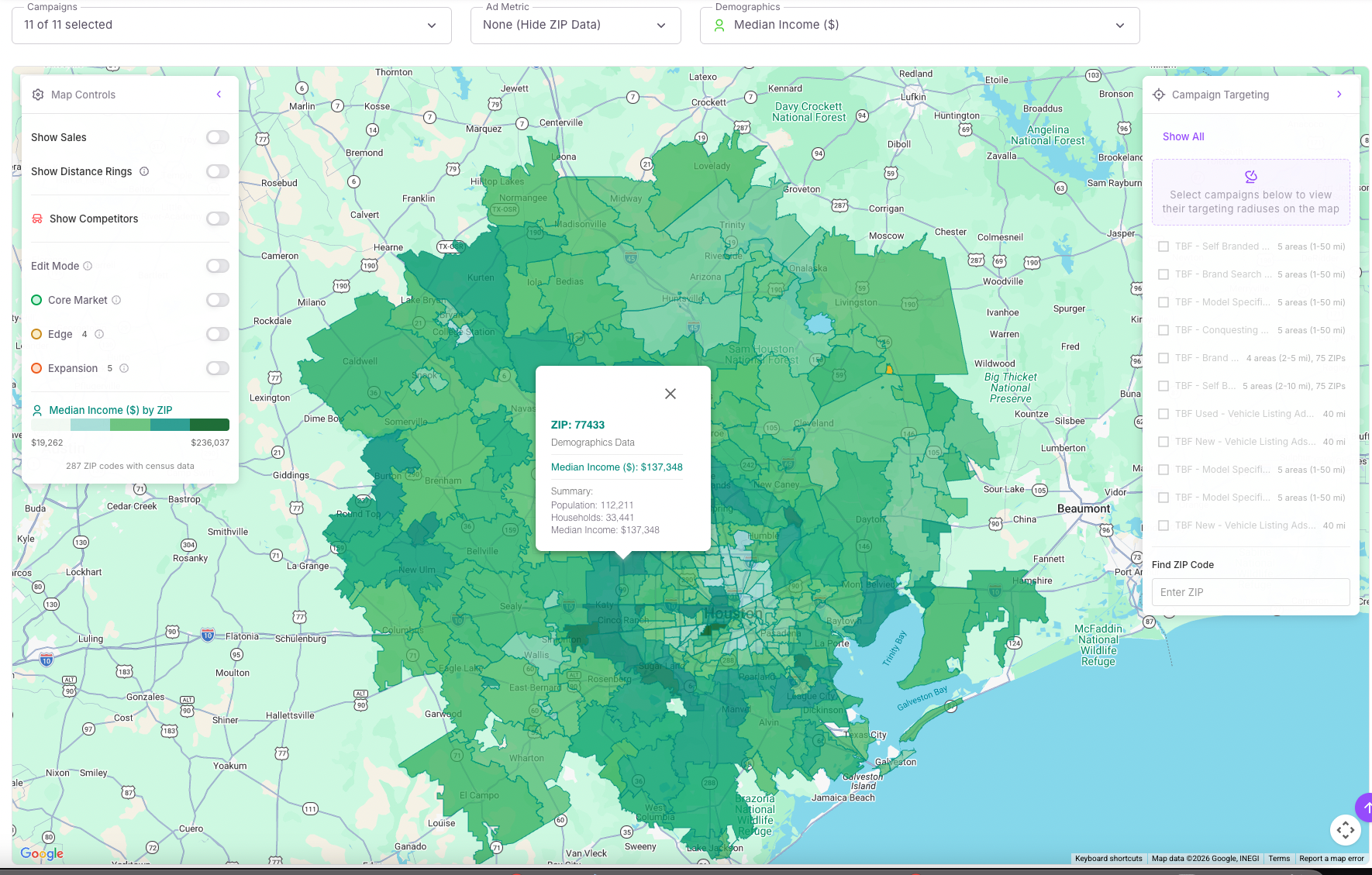
Demographics overlay showing median income by ZIP code

Demographic Intelligence

Tailor messaging and inventory strategy.

The Demographics Overlay provides census-level data to help you understand your market:

  • Household composition — Population, households, vehicle ownership levels
  • Income distribution — 16 brackets from under $10K to $200K+
  • Age demographics — Six cohorts from under 18 to 65+
  • Housing tenure — Owner vs. renter occupied

See how these factors correlate with your sales patterns.

AI Market Narratives

Know where you're growing—and where you're losing ground.

Geo Insights automatically analyzes your sales trends and generates plain-language narratives that highlight what's changing in your market.

Hotspots

Areas where sales are increasing. These are growth opportunities—double down on what's working.

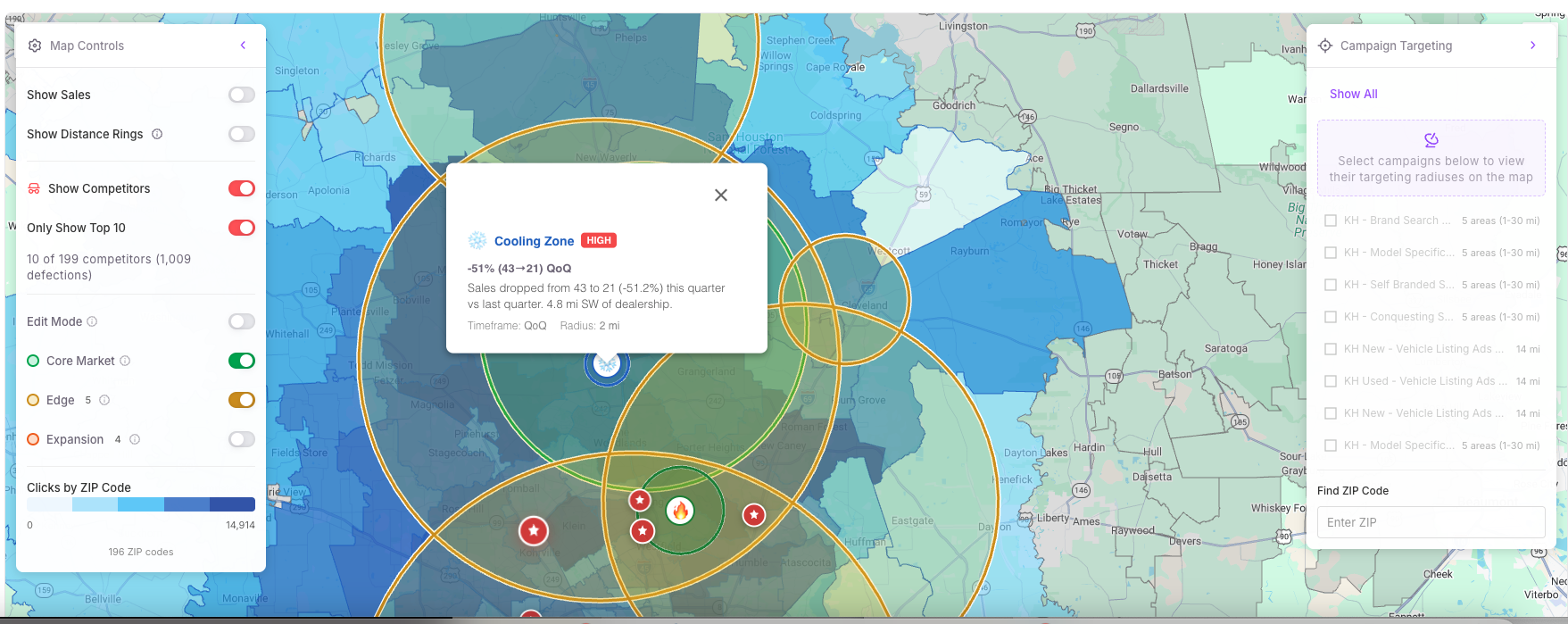
Cooling Zones

Areas where sales are declining—often a sign that competitors are conquesting your customers.

Click any highlighted area to navigate directly on the map and see the underlying data.

AI Market Narrative showing a cooling zone where sales are declining

More Features

Everything you need to optimize geographic performance.

📈

Spend Efficiency Trending

Track Cost/Sale across 30, 60, and 90-day windows. Downward trend (green) = more efficient. Upward trend (red) = costs rising. One metric that tells you if your strategy is working.

Editable Market Boundaries

Edit Mode lets you drag market centers, adjust radii, create new markets anywhere, and track all changes with full audit history.

Available in BETA

Ready to see where your money actually works?

Geo Insights analyzes 12 months of sales data combined with real-time Google Ads performance.