One checkbox inside Google Ads can double your reported conversions overnight. Your sales will not change. Your report will look incredible. That is not a bug. It is a setting. And most people who see the pretty number at the top of the report have no idea it is there.
How conversion counting works
Google Ads sorts conversion actions into two buckets: primary and secondary. Primary actions are the ones that count toward the number you see in the main columns and the number the platform optimizes toward. Secondary actions are tracked for context but kept out of that headline total. So the question that decides your reported performance is simple: which actions are marked primary? Change that, and you change the number, even if not one customer did anything different.
The duplicate-primary problem
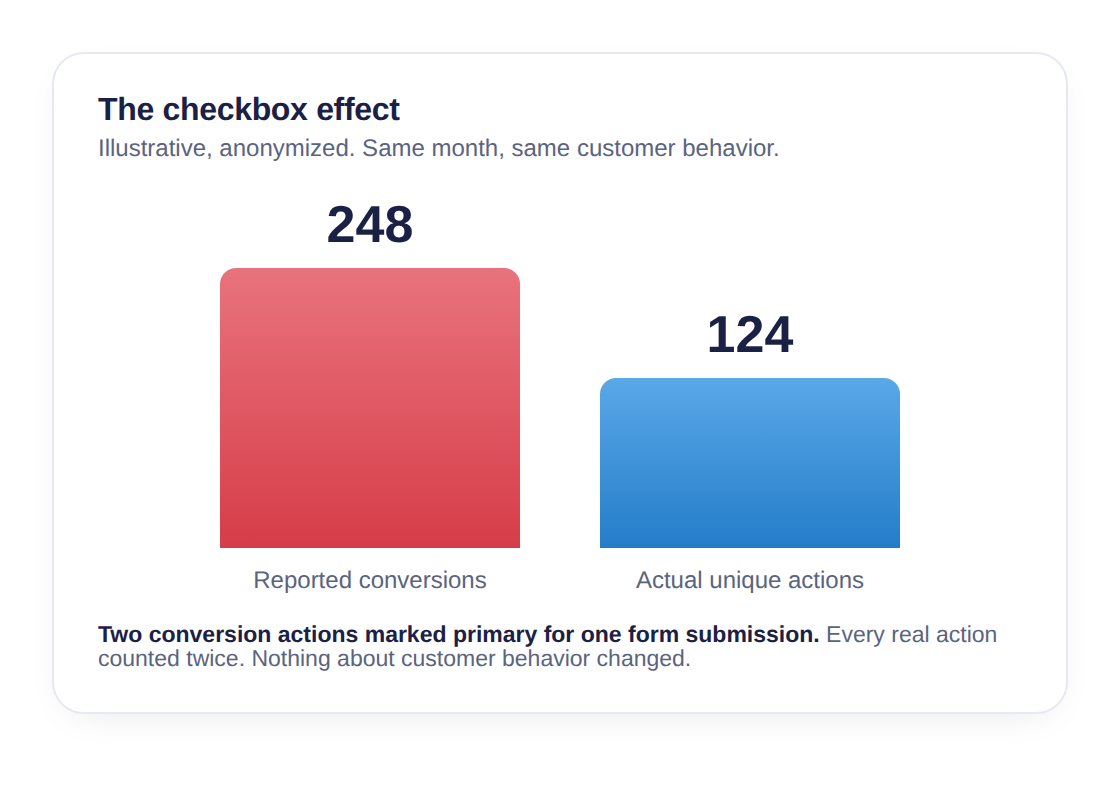
Here is where it breaks. Say a customer fills out one form on your VDP. That single form fill can be tracked by two separate conversion actions at the same time. One might be a legacy form tag from an old setup. The other might be a GA4 event imported later. Same behavior, two tags. If both of those are marked primary, that one form fill counts twice. Every real action gets counted twice. Ten genuine lead conversions become twenty on the report. The customer behavior underneath is identical. The number on top is doubled. This is what google ads duplicate conversions look like in practice, and it is not exotic. It is a checkbox.
How it happens innocently
Almost nobody sets this up on purpose. It is usually an accident, and I want to be clear about that: this is neglect or drift, not fraud. Accounts are old. They get migrated. A dealer switches platforms, or switches vendors, or moves from Universal Analytics to GA4. Each transition layers new tracking on top of the old. The GA4 import goes live, but the legacy tag never gets turned off. Nobody circles back to read the full list of primary conversion actions dealership by dealership and clean out the overlap. So two tags for the same behavior sit there, both primary, quietly stacking every count. No one decided to inflate anything. The inflation happened because nobody removed the old tag. The report does not care about intent. It just shows a doubled number, and everyone downstream treats it as real.
How you would ever know
You would not. That is the uncomfortable part. The doubled number does not look broken. It looks great. There is no red flag, no error message, no asterisk. The report is up and to the right, and up and to the right rarely gets questioned. The only way to catch inflated conversion numbers from a duplicate primary pair is for someone to open the conversion action list and read it, line by line, and recognize that two of those actions describe the same customer behavior. The person running the account is not incentivized to go looking. The dealer principal reading the summary cannot see the list from the summary. So it sits. Sometimes for years.
The check
The conversion actions live in one place. In Google Ads, go to Goals, then Conversions, then Summary. That page lists every conversion action in the account and, next to each, whether it is set to primary or secondary. Read the primary ones. Not the count, the names. You are looking for two actions that describe the same thing. Two form submission trackers. A phone-call action that also exists as a separate imported call event. A GA4 event sitting next to a legacy Google Ads tag that fires on the identical page action. When two primary actions describe the same behavior, every real instance of that behavior is being counted twice. You do not need to know how tracking is built to spot this. You need to be able to read plain English and notice when two lines mean the same thing.
DIY: check it yourself
- Open Google Ads. Go to Goals, then Conversions.
- Write down every conversion action marked Primary. Ignore the secondary ones for now.
- Read your primary list and group them by behavior. Which ones describe a form fill? Which describe a call? Which describe the same button or page action?
- If two primary actions describe the same behavior (two form trackers, or a GA4 event plus a legacy tag firing on the same thing), you are looking at double counting. Every real action in that pair is counted twice.
This takes about five minutes and needs no special access beyond the account you already have.
Audit CTA
When we audit a dealership's accounts, conversion health is section one. Before anyone argues about spend, placements, or which platform gets credit, the first question is whether the numbers everyone is arguing about are even real. Double counting from duplicate primary actions is one of the first things we check, because if the headline number is doubled, every conversation built on top of it is built on air. You do not have to take our word for any of this. You can read your own primary list today. If you find a duplicate pair, do not accuse anyone. Bring your agency these questions instead:
- Which of our primary conversion actions track the same customer behavior?
- Do we have both a legacy tag and a GA4 import counting the same form or call?
- When we migrated platforms, was the old tracking ever turned off?
- Can you walk me through why each action is set to primary rather than secondary?
Those are fair questions. A good partner will have clean answers. Has anyone independent ever read your conversion action list? That is a five-minute check in the free audit. Example numbers in this article are illustrative and anonymized. They are not from a specific dealership audit.